Once your Livestock Card is in your hands, the first question is simple: how much money is on it? Knowing your balance before you visit a dealer saves you time and embarrassment at the counter. In 2026, checking your Livestock Card balance is easy — you can do it online with your CNIC, through the helpline, or at the bank. This guide shows you every method, step by step, plus how to read your transaction history.
Detail
Information
Feature
Livestock Card balance check
Online Method
plc.punjab.gov.pk with CNIC
Helpline
0800-09211 (24/7, toll-free)
Card Limit
Rs. 135,000 to Rs. 270,000
Usage
Registered dealers only
Year
2026
Why Check Your Balance
Your Livestock Card is not cash — it is a credit limit for buying feed and supplies from registered dealers. The amount depends on how many animals you own: farmers with 5 animals get Rs. 135,000, while those with 10 or more can get up to Rs. 270,000. Checking your balance tells you exactly how much you can spend right now.
Smart farmers check their balance before every purchase. It takes two minutes and keeps your budget on track. You also catch mistakes early — if a dealer charged you wrong, your transaction history will show it.
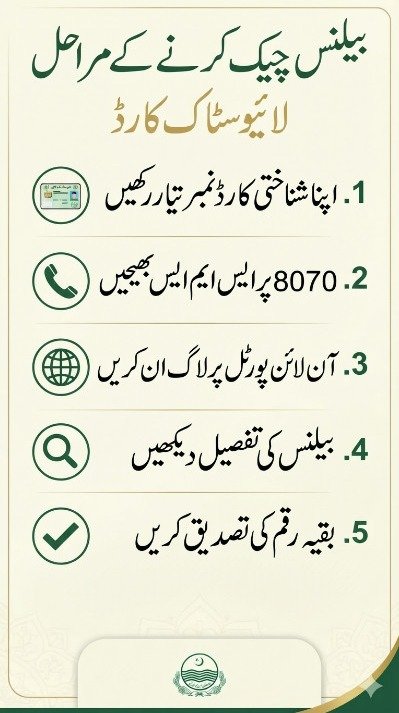
Find balance inquiry: Look for the “Balance Check” or “Card Services” section
Enter your CNIC: Type your 13-digit CNIC number without dashes
Verify: You may get an OTP on your registered mobile number — enter it
See your balance: Your available limit and used amount appear on screen
Write down your balance or take a screenshot. Phone screens are easy to forget.
Other Ways to Check Balance
No internet? No problem. You have other options:
Method
How It Works
Helpline
Call 0800-09211, give your CNIC, and ask for your balance
Bank of Punjab branch
Visit any of the 131 branches with your card and CNIC
Registered dealer
Ask the dealer to check before you buy — they can see it
SMS (if available)
Check the portal for any new SMS balance codes
The helpline is free and open 24/7. Keep your CNIC number ready when you call.
Understanding Your Transactions
Your transaction history shows every purchase made with the card. Each entry has the dealer name, the date, the items bought, and the amount. Review it monthly — it is your spending record.
Look for anything you do not recognize. If a transaction appears that you never made, call the helpline immediately at 0800-09211. Quick reporting protects your money. For details on where you can spend, see our guide to Livestock Card benefits.
What the Numbers Mean
Two numbers matter on your card:
Total limit: The maximum amount assigned to you (Rs. 135,000 to Rs. 270,000)
Available balance: What is left after your purchases — this is what you can spend now
Every purchase reduces your available balance. The loan is interest-free, but you must repay it on schedule. Check the eligibility criteria if you are unsure about your limit.
Common Balance Problems
Sometimes the balance does not look right. Here are quick fixes:
Balance shows zero: Your card may not be activated yet — visit a Bank of Punjab branch
Portal does not open: Try again later, or use the helpline instead
Wrong CNIC error: Check that you typed all 13 digits correctly, no dashes
OTP never arrives: Make sure your registered SIM is in the phone and has signal
Balance lower than expected: Review your transaction history for purchases you forgot
Most problems are small. The helpline at 0800-09211 can sort out anything confusing.
Keep Your Card Safe
Your Livestock Card is as good as money at registered dealers. Treat it that way:
Never share your card or CNIC details with strangers
Do not let anyone take your card away — always watch the transaction
Keep the helpline number 0800-09211 saved in your phone
Report a lost card to the bank immediately so it can be blocked
Livestock & Dairy Development Department, Government of Punjab
Conclusion
Checking your Livestock Card balance takes two minutes and keeps you in control. Use the portal, the helpline, or your bank branch — whichever is easiest. Check before you buy, review your transactions, and keep your card safe.
FAQs
How can I check my Livestock Card balance by CNIC?
Visit plc.punjab.gov.pk, go to the balance check section, and enter your 13-digit CNIC. Your available limit and used amount will appear.
What is the Livestock Card limit in 2026?
The limit ranges from Rs. 135,000 for 5 animals to Rs. 270,000 for 10 or more animals, depending on your verified livestock.
Can I check my balance without internet?
Yes. Call the toll-free helpline 0800-09211 with your CNIC ready, or visit any Bank of Punjab branch.
What should I do if my balance looks wrong?
Review your transaction history first, then call 0800-09211 immediately if you see purchases you did not make.
Shahzad Sahil is the editor of plcpunjab.pk, covering Punjab government schemes including the Livestock Card, eligibility, registration and latest updates, with information verified from official sources for readers across Punjab.
On 14 October 2026, CM Punjab Maryam Nawaz launched Livestock Card Phase 2 in Lahore. She announced Rs16.2 billion in interest-free loans and a plan to make Punjab a calf hub linked with international meat exporters. CM Punjab Maryam Nawaz has put livestock farmers at the center of her agriculture policy. On 14 October 2026,…
The Livestock Card is changing the lives of women farmers across Punjab. Women now get special support to build livestock businesses of their own. This guide covers the benefits for women, who can apply, and the step-by-step process — with all the latest 2026 updates. Detail Information Feature Livestock Card for women farmers Women Cardholders…
There is big news for the cattle farmers of Punjab. Chief Minister Maryam Nawaz Sharif formally launched the second phase of the Punjab Livestock Card in Lahore on 14 October 2026, opening Rs 16.2 billion in interest-free loans for livestock farmers across the province. Under this phase, farmers get Rs 27,000 per animal for feed,…
The official Livestock Card helpline 0800-09211 works 24 hours a day, 7 days a week. It is toll-free. Farmers can call for registration help, card issues, and complaints. Stuck with your Livestock Card application? Card not working at a dealer? The Punjab government has set up a dedicated helpline for livestock farmers: 0800-09211. It works…
Getting a rejection message for your Livestock Card application feels bad. You were counting on that interest-free loan for your animals, and now the door seems closed. But here is the good news: most rejections happen for small, fixable reasons. A wrong CNIC digit, untagged animals, or a missed document — these are the usual…
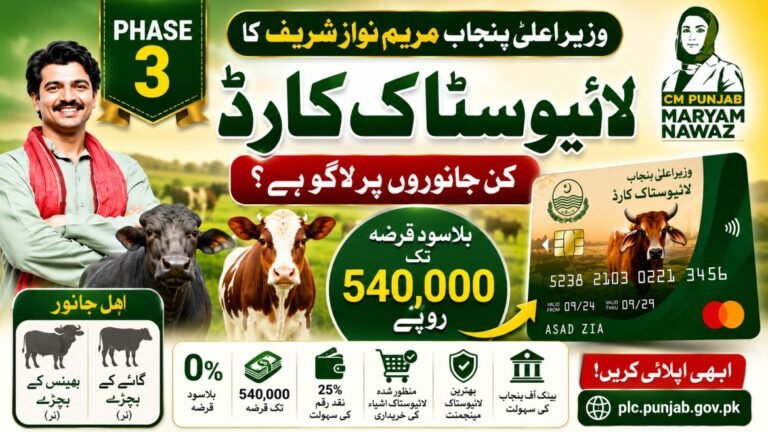
The CM Punjab Livestock Card Phase 3 is designed to support eligible livestock farmers through an interest-free loan facility. Before applying, many farmers want to know which animals qualify under the scheme. According to the official eligibility guidelines, the program is intended for farmers who own eligible cattle and buffalo young stock within the required…